RaiNGE software
A workout builder for personal trainers where AI drafts and you approve
The builder is the screen where a coach does the work. This page shows what one training day looks like there, where AI drafting and safety rules sit in it, and what stays in your hands.
By RaiNGE product teamUpdated
Written for personal trainers who build client programs by hand or in a spreadsheet and want to see what a coach-controlled builder with AI drafting looks like.
RaiNGE is in private beta for coaches. Apply to see the builder on your own clients and approve every program.
On this pageWhat one training day looks like in the builder
What one training day looks like in the builder
A training day in RaiNGE's builder is a list of exercises. Each one carries its own sets, reps, RPE, and rest, with an edit panel beside it, and a draft gives each exercise a short coaching note you can keep or rewrite. You change what you want to change, then assign the program.
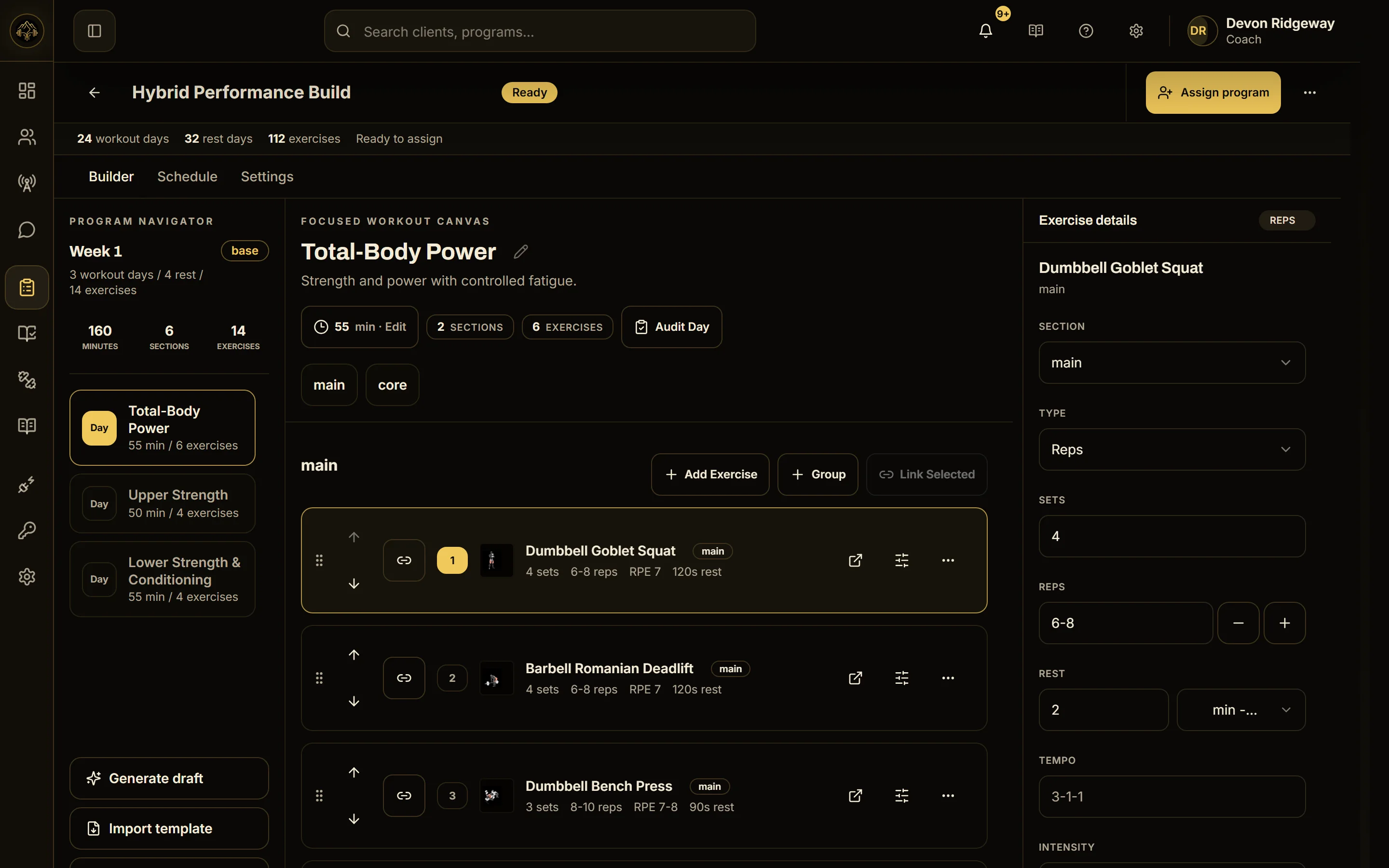
That gap between drafting and assigning is the point of the screen. It is where you read the day against what you know about the person. For the whole programming job and the buying decision around it, see personal training programming software. For an online coach's week, see online personal training software.
Where AI fits in the builder, and what stays manual
The AI writes a first draft and suggests. A draft starts from the client's goals, training history, equipment, schedule, injury and pain notes, and readiness check-ins, so the day you open is already shaped to that person. It is a draft, and you decide what the client gets.
What stays manual: your structure and emphasis, your cues, which swap keeps the point of the session, and every pain decision. RaiNGE does not diagnose, treat, or route clients to clinicians, and nothing changes an assigned plan until a coach approves it.
The same Tuesday session built three ways
Take one client's Tuesday lower-body day and build it three ways. The result can look the same on paper. What differs is where the facts live, what you have to check, and where a mistake can hide. No times are shown here: time your own week before you compare routes.
Every route ends the same way: you read the day and you own it. The routes differ in how much of the client's context you have to carry in your head while you do.
Worked example: a low-back flag, a swap request, and what the coach checks
This is an example, not RaiNGE data or a customer result. A coach has a 38-year-old client who trains three days a week with dumbbells, a cable stack, a bench, and a leg press. The profile carries a low-back flag from a flare last year, and the goal is general strength.
- 1
Open the Tuesday draft
The low-back flag has already acted on the draft: loaded hinges (deadlifts, RDLs, good mornings, pull-throughs), barbell hip thrusts and barbell glute bridges, barbell squats, and loaded spinal flexion are out, and the caution is shown. An invented example draft reads goblet squat to a box 3×8 at RPE 7 with 120 seconds rest, dumbbell split squat 3×8 a side, seated leg curl 3×12, and standing calf raise 3×12. A real draft depends on the client's profile.
- 2
Read the caution before the numbers
The rules act on the flag. They cannot see how this client moves. Ask whether anything in the day loads the back in a way the rules would not name, such as a long unsupported hold at the end of a set.
- 3
Ask for a swap
The client wobbles on split squats, so the coach asks for a swap. The AI suggests a few alternatives, the safety rules drop any that conflict with the low-back flag, and cautioned options come last. An invented example list: leg press, box step-up, and a third option with a caution attached, listed last. The rules decide what is on a real list.
- 4
Check the swap, not just its name
Does the client have the equipment? Does the swap keep the point of the session? Leg press is two-legged work, so it changes single-leg quad work into bilateral work. Read the caution on any option below the first. Here the coach accepts the change for this block and notes to revisit it.
- 5
Set the dose and assign
The coach sets leg press to 3×10 at RPE 7 with 120 seconds rest, reads the day once more against the profile, and assigns. The client sees the program right away.
- 6
Change an assigned workout in week 2
The client reports heavy legs after Saturday. The coach cuts leg press from 3×10 to 2×10. The change applies to the assigned workout as one change that can be reverted, and the client is notified after it succeeds.
If the client reports pain at any point, use the bands in the pain score modifications guide. The low-back deadlift alternatives guide covers the hinge decisions for a flagged client.
Ten questions to ask of any program builder
These work for any tool. Ask them in a demo on one of your own clients, not on the vendor's sample, and ask to see each answer happen.
Ask, then watch it happen
- Can you set sets, reps, RPE, and rest on each exercise, or only on the day?
- Can you swap one exercise without rebuilding the day?
- Does the tool suggest alternatives, and are options that conflict with the client's flags kept out of the list?
- Can you see what changed after an edit, and who changed it?
- Can you revert a change to an assigned workout in one step, and is the client told when it changes?
- Can you lock an exercise so an automated adjustment cannot touch it?
- If AI drafts, does the draft wait for your approval, or can it reach the client first?
- Can the client see a draft you have not assigned?
- Does a draft start from the client's stored injury notes and equipment, or from whatever you type each time?
- Does the exercise library use one name per movement across your clients and coaches?
For a scored test of any AI tool, use the 30-minute evaluation. For the money, data, and exit questions that sit outside the builder, see questions to ask before buying coaching software.
Who should look elsewhere, and what private beta means
- Trainers who need payments, nutrition tracking, habit coaching, or a branded client app in the same tool. RaiNGE does not claim any of them. The seven-option comparison shows tools that cover more of the client-facing side.
- Coaches who want drafts to go out unreviewed. Every draft waits for a coach. That step is the product.
- A small, stable roster on a template you like. The personal training program template works in a spreadsheet, and a switch has a cost.
- Clinical or rehab work. RaiNGE is decision support for qualified coaches, and it does not diagnose or treat.
RaiNGE is in private beta. You apply through the beta application, and pricing is not published yet. If you want to see a draft before you apply, the free sample workout builds one workout from a short intake.
Common questions
What can I edit on each exercise in a draft?
Sets, reps, RPE, and rest sit in the edit panel beside each exercise, and the coaching note can be kept or rewritten. To change the exercise itself, ask for a swap and choose from the alternatives it suggests, or pick your own.
What does the builder do for a client with no injury flags?
The draft still starts from goals, history, equipment, and schedule, but the safety rules act on flagged limitations, so with no flag they have nothing to remove. Read the whole day yourself, and fill the injury notes in at intake so a later flag has context.
Can I import my spreadsheet programs into the builder?
RaiNGE claims no imports from other platforms and no integrations with other tools, so existing programs are entered by hand. Move your newest clients first and measure the cost, as the switching guide sets out.